Nx5d API Guide
Although it does have some command-line tools to go along with it, Nx5d in itself is not an application. It's a framework. This means that you're intended to write your own code to incorporate it into your data analysis setup. To that end, here we impart structural understanding about Nx5d's primary API elements.
The focus lies on broad strokes about how "it all comes together". For specific details, see the API reference section. For specific usage examples that you can type along with, there's an example section, too.
The main focal points are:
-
where to find the data: using Repository classes.
-
how to load and sort the data: using Proposal, Scan and Collection classes
-
how to manage and process data, respectively spice: using recipes and the spice manager.
The following cartoon shows a bird's eye perspective of the class system that manages the interplay between data and spice.
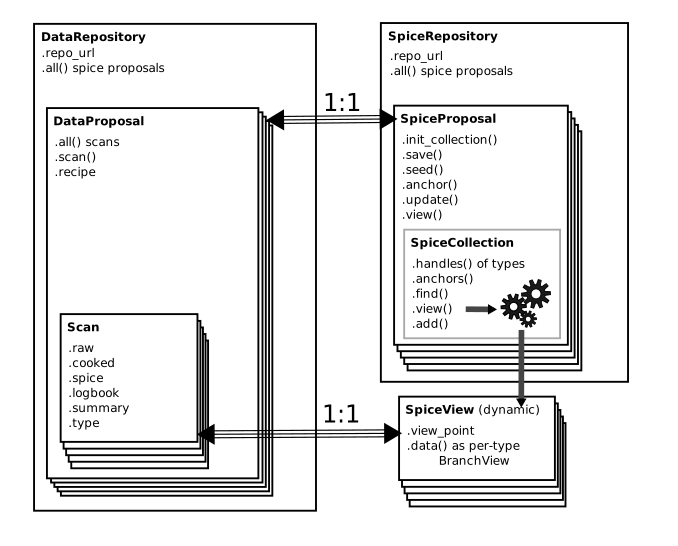
The most important features, which we'll cover in depth in this section, are:
-
to a certain degree there's a parallel growth between spice and data at repository level
-
there is a 1:1 correspondence between spice and data on proposal level
-
there is no such correspondence on a scan level; instead, data scans have a 1:1 correspondence with dynamically-generated spice views.
Repositories
This is all about data analysis; and the data has to be somewhere.
Defining and/or configuring appropriate Repository classes is how
to tell Nx5d where your data and spice
folders are, and how to list the
proposals
therein.
The base class for repositories is nx5d.repo.base.DataRepositoryBase.
It is responsible for:
-
managing the data URL,
-
listing available proposals,
-
delegating loading operations to the appropriate proposal class.
Managing the data URL
To prepare for transparent loading from a variety of sources, Nx5d
preferrably addresses data by means of URLs, e.g.
file:///home/data/{proposal}/data.h5#{scan},
or s3://data.institute.org/{proposal}/data.zarr/{scan}.
The repository classes deal with URL formats, not with finished
URLs. Formatting keywords enclosed in {...}-brackets are used to complete
and extract information from URLs or subfolder
listings. Using the keywords {proposal} and {scan} is part
of the API definition, and most of the correspoding Nx5d code depends
on them: they extract the keys by which the proposals,
respectively their scans are identified on disk.
The base repository class offers the property .repo_url to
access the initial URL format.
Listing proposals
Nx5d uses two naming schemes for proposals:
-
keys are the actual string component that's required to fully identify the base of a proposal's location (i.e. what
{proposal}will be substituted for). Usually they contain numbers and letters, but may also contain any kind of special characters (-, /, @, ...) -
handles are a beautified version of the same information -- i.e. one unique handle for each key. They are required to be compatible with Python's naming convention, therefore must not contain special characters besides underscore (_), and must begin with a letter. Repository keep an internal map of handles <-> keys, and they use handles to offer comfortable access to proposal instances by means of Python's
__dir__()and__getitem__()overloaded operators, e.g. automatic discovery and auto-completion in environment that support auto-completion (Spyder, IPython, Jupyter, ...)
The repository classes offer API elements to deal with keys and
handles, and to create instances of proposal classes (see below):
the method .all() returns a key->handle map (dictionary) to
list all proposals that a repository contains. Similarly,
.keys() and .handles() return lists of strings containing only
the keys, respectively the handles.
Delegating load operations
The repository base class offers the .proposal() method.
It is expected to return an instance of an appropriate
proposal class,
capable of loading data. To that end
.proposal() itself calls the lower-level
._proposal() method -- which
needs to be overwritten in custom implementations. The latter
does the actual instantiation. They're both defined as part
of the repository API: one for the user to use, the other
for the backend developer to define repository structure.
Available repository classes
Nx5d supports a number of repository implementations out of the box, possibly more to follow:
-
FsDataRepository(defined asnx5d.repo.filesystem.DataRepository), is the most commonly used one. It assumes that repositories are folders on a filesystem, and proposals are subfolders or files with a proposal-specific name. -
S3DataRepository(work in progress) assumes that data is saved at an AWS S3 compatible HTTPS location. This is most useful for chunked data formats, like Zarr. -
HttpDataRepository(planned) wants to access data through HTTPS array-like APIs, e.g. Bluesky's Tiled server.
Dealing with spice
The repository classes are also used for managing spice access. At its core, spice is data just the same as "real" experimental data.
Although experimental data, and spice data, are often kept
in the same subfolder, Nx5d internally still treats them as
different repositories. There are different environment
variables (NX5D_DATA_REPO, respectively NX5D_SPICE_REPO)
which govern the location of each.
This is because access to experimental data is strictly
hierarchical (repository -> proposal -> scan -> frame),
while handling of spice diverges at the
proposal level (repository -> proposal -> views and
branches). The main practical difference is that .proposal()
methods of a spice repository don't return proposal management
classes; they return classes suitable to spice management instead.
The spice subsystem in nx5d.spice therefore spawns its own
repository subclasses, derived from DataRepositoryBase:
-
SpiceRepositorythe base class for spice work -
FsSpiceRepositoryfor loading spice from a folder on a filesyste (e.g. file:///home/data/{proposal}/spice)
Apart from that, spice repositories are subject the same considerations as the data repositories.
Data Proposals
In analogy to repositories, Proposal classes are responsible for listing available scans and delegating loading to the the appropriate scan class.
Core responsibilities
Their core API elements of the base class
nx5d.repo.base.DataProposalBase are:
-
methods for scan listing simliarly to those of a proposal (
.all(),.keys(),.handles()), subject to the same key <-> handle distinction -
.scan()a method to return a scan class instance, and the corresponding backend abstract method._scan()to be overwritten by derived classes -
.recipe()expected to return a callable (i.e. Python function) to cook the data. The default behavior is to look for a spice type "recipes", which is expected to match the scan type to a suitable processing resource, e.g. a callable within a user-supplied, locally installed Python package.
Available implementations
Although you're free and encouraged to write your own, there are a number of proposal classes that come pre-packaged with Nx5d. These are of particular use if your data layout tries to keep to typical standards and best-practices within your community:
-
FsDataProposal(a.k.a.nx5d.repo.filesystem.DataProposal), which tries to locate scans in a subfolder on the local filesystem. This is a good starting point e.g. for all "do-it-yourself" data formats that store experimental data in various ".ini", ".dat", ".numpy" or ".tiff" files across the local hard disk. -
AstorDataProposal(a.k.a.nx5d.repo.astor.DataProposal) assumes that data of a complete proposal is stored in an array-based backend (e.g. HDF5, Zarr or Tiled) and that listing the scans therein is as comfortable as listing hierarcy branches of the array.
Scan proposals are fundamentally different and are discussed below.
Scans
The classes that do the "heavy lifting" in terms of loading and processing are the Scans classes. They are responsible for obtaining the data from disk, invoking various processing recipes, and exposing raw and cooked data versions to the user. They are also knitting together the experimental data and spice data of a proposal.
These are the classes the end user (i.e. scientist) is
interacting with most of the time.
To this end the base class nx5d.repo.base.DataScanBase is
exposing a number of properties:
-
.typea string that describes the type of scan, unambiguously within the framework of the data repository in use; scans of a type have the same data and positioners, and are to be analysed/processed in the same way. This is essential to determine the recipe for data processing. -
.summary, a.k.a. "scan metadata": a key-value store ("dictionary") of information that can be rapidly obtained about the scan. Often building the summary is less computing and I/O intensive than doing a full-open or full-retrieve of all the scan data. -
.logbooka representation of logbook entries associated with this particular scan, or point in time during which this scan was measured. -
.rawthe collection of all data that was measured and is supposed to remain unchanged; typically, this is in some version of "device coordinate system" (angles, intensities, distances...). This is anxarray.Dataset. -
.cookedthe cooked data, i.e. result of data cooking. This is the experimental data transformed into a physically more meaningful format as anxarray.Dataset. -
.spicethe spice view for this scan. This is typically anx5d.spice.SpiceViewobject.
The scan classes supplied with Nx5d are currently heavily backend (i.e. beamline) specific. But there appears to be great uniformization potential, in particular if relying on an underlying standardized storage format like Nexus.
To implement a custom scan class on top of the
DataScanBase base class (from the nx5d.repo.base module),
some crucial methods need to be overridden. Currently
these are:
-
._get_summary()expected to compile the summary dictionary -
._get_raw()expected to load the raw data into anxarray.Dataset. The dataset needs to hold all data relevant for processing, except for spice. It will be passed as-is to the processing recipes. -
._get_logentry()expected to load logbook data. (This is currently in a very early planning stage; as of September 2025 there's no API to programmatically represent log data yet.)
Here some examples of the scan classes currently shipped with Nx5d out-of-the-box:
-
KMC3's
DsFactoryScan(from thenx5d.xrd.kmc3module) relies on using an Nx5d data loading abstract, theDatasetFactory. (This is the closest we currently get to a standardized loading interface, there's lot of room for improvement) -
UDKM's
DataRun(from thenx5d.xrd.udkmmodule) implements a prototype form of a scan for the UDKM group at Uni Potsdam. This is soon to be obsolete; however, currently it's still a good example of a heavily customized scan API for a local and obscure data storage format ;-)
Another scan type, the StackedDataScan from the
nx5d.repo.base module, deserves in-depth attention.
It started out as a hack to concatenate
several data scans of the same type into a new, virtual one,
with a type of its own.
This is a useful feature to have when the beamline setup is systematically broken in a way that can't easily be fixed. Sometimes what should have been measured and stored in the raw data as one scan over multi-dimensional grid parameters (e.g. angles, temperature, delay times) is in fact stretched out over several, manually-triggered scans. Concatenating the scans into a new one, with a new type, makes it possible to trigger a different kind of processing recipe.
The puristic and correct answer to such situations would, of course, be "fix your darned beamline!"
But apparently it's... complicated. It turns out that a disconcerting number of beamlines are "temporarily" broken this way, including KMC3 at times. This makes it a de-facto normal situation, not an exceptional one -- a situation that Nx5d aims to offer relief to. This is why the API contains explicit support for such an ad-hoc data transformation -- and we're using our own creation, the spice mechanism, to automate this as well as possible.
Spice Collections And Views
Spice is managed differently.
The entirety of a proposal's spice is a spice Collection Spice is always being introduced, modified, generally handled, at collection level. This is because one of the major strengths of the spice concept is the ability to provide useful defaults -- and this only works at a level above individual scans.
Nonetheless, it's for individual scans that spice is required for processing: we therefore have spice Views -- potentially one for each scan. The spice view class offers to every scan it's own, customized access to all of a proposal's spice types: with default data if not otherwise specified, or with customized values if customized values were stored for this particular (range of) scans.
The responsibility of the nx5d.spice.SpiceCollection class
is to hold together an internal representation of the spice tree,
and offer algorithms for traversing, searching and extending the
it:
-
.add()for registering a new spice entry. This can be a seed or an update. -
.view()generate a view of the proposal's spice tailored to a specific viewpoint (i.e. scan). -
.find(),.handles()and.anchors()are API elements that the typical scientist-user generally won't need; nonetheless they are available, and they serve the purpose of sifting through the spice tree by various criteria. (Note that a "spice handle" is the same as a "spice type".)
The nx5d.spice.SpiceView class is what every
data scan class receives in order to be able to process
its own raw data. Its API is designed to browse and retrieve
the local spice data:
-
.view_pointreturns the view point that was requested in the making of this view -
.datareturns a dicitonary with spice types (or "handles") as keys, and the spice data asBranchViewclasses as values -
.handles()the spice types (handles) contained in this view, this is the same as.data.keys(). -
the class also overrides
__dir__()and__getattr__()to return the corresponding spice branches in a discoverable way.
Speaking of which: spice Branches are object representation of a "spice instance", i.e. the data of one spice type for a specific viewpoint. They are called "branches" because Nx5d's spice storage backend is an incremental no-delete database: data is perpetually updated or eventually marked as deleted, but never removed. Branch views contain the complete history of a spice type's updates. The typical user doesn't interact with most of it except in rare cases, e.g. of conflict management when merging spice updates from different locations. (This is also a feature of Nx5d: the data is more resilient to cyberattacks, because accidentally exposing credentials still doesn't make it possible to destroy data.)
The branch classes offer API for access to:
-
spice data, via
.data()dictionaries or via dynamic attributes through__dir__()and__getitem__()overload, -
internal spice metadata like UUIDs and revisions via dictionaries supplied in
.meta(), -
additional tasks mostly used by developers of spice management systems, e.g. via
.make_update()for creating spice-update objects, -
convenient data representaion as Xarray types via
.xr().
Spice Proposals
Spice Proposals are fundamentally different from data proposals.
They don't have a designated sub-entity commensurate with
to scans. They aren't even derived from DataProposalBase,
but are the starting point of their very own, independent class
hierarchy.
Spice proposals encapsulate Collection classes. Both spice
collections and proposals deal with spice at a proposal level.
The difference is that collections deal mostly with handling
spice based on its in-memory tree representation, while
proposals encapsulate the main
spice operations on disk
(.seed(), .anchor(), .update() and .view()).
In essence, while spice collections are backend-agnostic,
spice proposals are inherently backend-dependent.
The spice proposal base class nx5d.spice.SpiceProposal
implements the file-format
independent part of the edit operations (though they're
not entirely backend agnostic, they still assume a JSON
data structure format!) The actual operations that implement
loading and saving need to be overwritten:
-
.init_collection()loads the spice data from disk and into memory. Users typically never have to access this, it's triggered at appropriate times by corresponding layers of Nx5d. -
.save()stores a particular, newly-created spice object back into the database.
There are some specific implementations:
-
FsSpiceProposalloads / saves spice into a filesystem-based format, as a bunch of JSON files. -
MemorySpiceProposalhas the ability to load "real" spice into memory, e.g. from another "template proposal" (for instance FsSpiceProposal). But the save operations don't... save. Instead, the class just mimics saving spice, while keeping the changes in memory only. This is a nice way to test most of the spice infrastructure, or to play around with data analysis while keeping changes to the spice database local to your Jupyter notebook only -- a trick we're using a few times in our tutorials ;-) This is also how slim's "dry-run" mode is implemented.